
In many companies the week starts the same way. Someone exports data from the ERP, pastes it into last week’s Excel file, fixes the formulas that broke, and sends the report as a PDF. By the time it arrives, the numbers are already a few days old, and the first reply is usually a question the report cannot answer.
Manual reports are not a technology problem. They are a habit, and they cost much more than the hours it takes to prepare them. The good news is that replacing them does not require a big project. It requires a clear method.
The hidden cost of a manual report
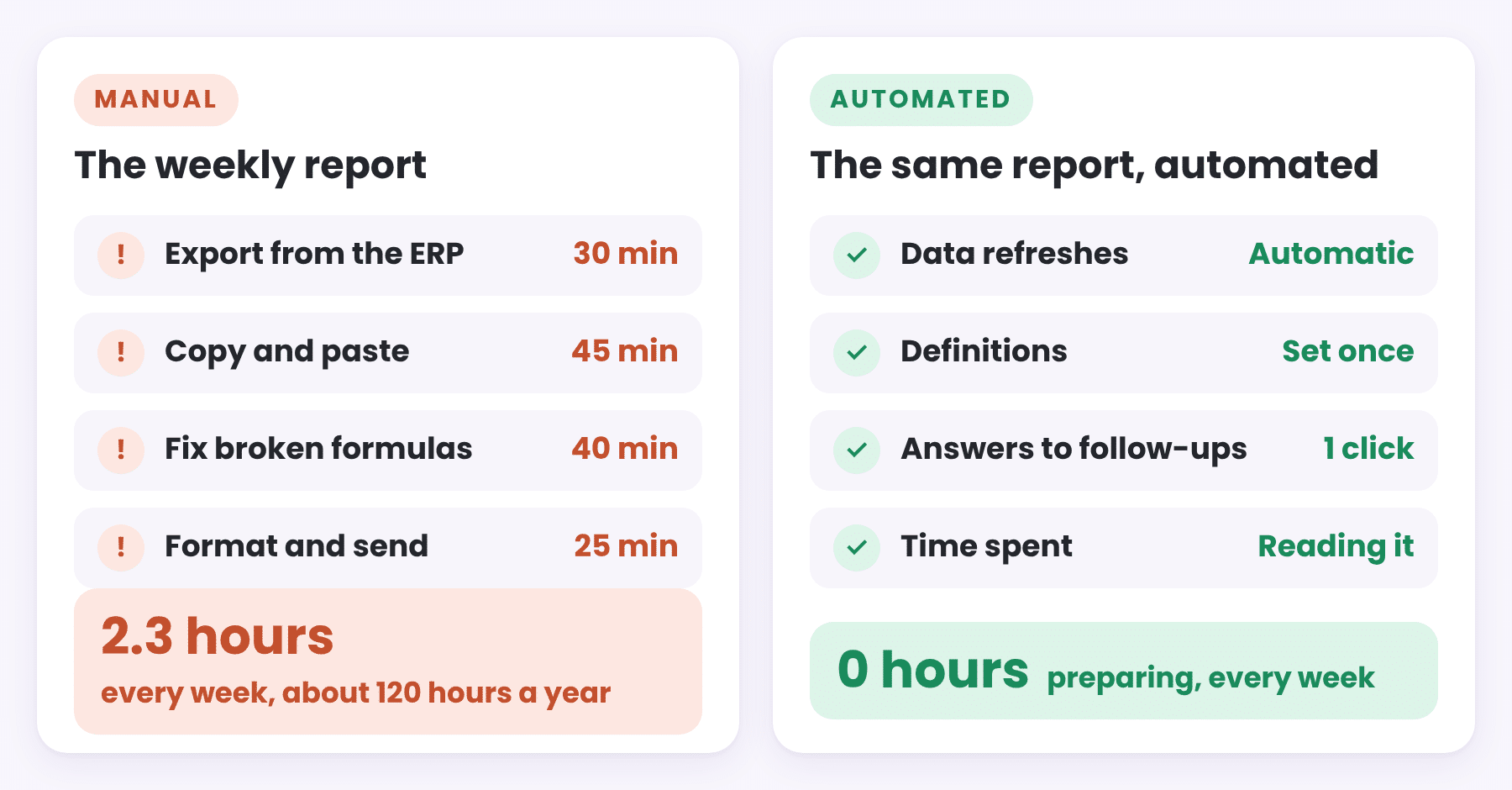
- Time: a few hours every week adds up to weeks of work every year, often by the most experienced person on the team.
- Errors: one wrong paste or a formula that covers one row too few, and the total is wrong without anyone noticing.
- Versions: three files called “final”, and two managers arriving at the same meeting with different numbers.
- Dead ends: a static table shows that sales went down, but not which customer, product or agent is behind it.
- One person: when the person who builds the report is on vacation, the report is on vacation too.
What automation really means
Automating a report is not about producing the same table faster. A good automated report changes three things:
- The data refreshes by itself. The report connects directly to the source, an ERP database or a set of Excel files, and updates on a schedule. Nobody copies anything.
- The logic is defined once. Net sales, margin and growth are calculated in one place, as measures, so every page and every user gets the same number.
- The report answers the next question. Instead of a fixed table, users can filter, drill down and open the details behind any number.
Five steps to replace a manual report
- List the decisions, not the columns. Ask who reads the report and what they decide based on it. A report built around decisions is usually shorter than the one it replaces.
- Find the source of every number. For each figure, write down which system and which table it comes from, and how it is calculated. This is where hidden rules show up, like “we always exclude internal customers”.
- Build a clean model once. Separate the transactions from the lists of customers, products and dates. We explain how in The Data Model Behind a Good Dashboard.
- Rebuild the logic as measures. Sales, margin, change vs last year and target achievement, each defined once and reused everywhere.
- Run both reports in parallel. For a few weeks, compare the new report with the old one. When the numbers match, or the differences are explained, switch off the manual one.
From numbers to action
Once the report refreshes by itself, the time that went into preparing it can go into reading it. This is where a report can do more than show numbers: it can compare periods on its own, highlight what changed, and write the conclusion in a sentence. We describe this kind of report in From Dashboards to Analysis Systems: What Power BI Can Do Today, and the method behind it in Sales Went Down. Here Is How to Find Out Why.
What to automate first
| A good first candidate | Why |
|---|---|
| A report prepared every week or month | The time saved repeats every period |
| A report that always raises the same follow-up questions | Drill down answers them in the report itself |
| A report that combines several sources | Copy and paste between sources is where most errors start |
| A report whose numbers often disagree with others | One set of definitions ends the argument |
Start with one report, do it well, and let the people who use it ask for the next one.
Keep reading
From the BistarData shop
Start from a ready model
Most manual sales reports answer a version of the same few questions. Our Power BI templates already answer them, on a clean model with every measure defined once:
- Sales Signals: what changed vs last year and why, written in plain language
- Sales Journey: Quote to Invoice: quotes, orders and invoices in one flow
- Sales Team Scorecard: every agent against a monthly target
- Customer Compass: customer segments, retention and customers at risk