

Every sales meeting eventually reaches the same question: sales are down, so what happened? The usual answer is a long table sorted by percentage change, followed by a discussion about the product that fell 60%, which turns out to be a product that sells almost nothing.
Finding the real reason is a method, not a guess. It comes down to four steps: measure the change against the right baseline, rank the contributors by how much they explain, split price from volume, and look at customers.
Step 1: Measure against the right baseline
Compare with the same period last year to remove seasonality, and with the previous month to catch what changed recently. In both cases, compare the same number of days: the first 12 days of this month against the first 12 days of the comparison period, not against a whole month. We explain why in Month to Date, Year to Date and Last Year: Getting Period Comparisons Right.
Step 2: Rank by contribution, not by percentage
A 60% drop in a small product matters less than a 5% drop in your biggest category. Rank every cost center, agent, product and customer by how much of the total change it explains, in money, not by its own percentage change.
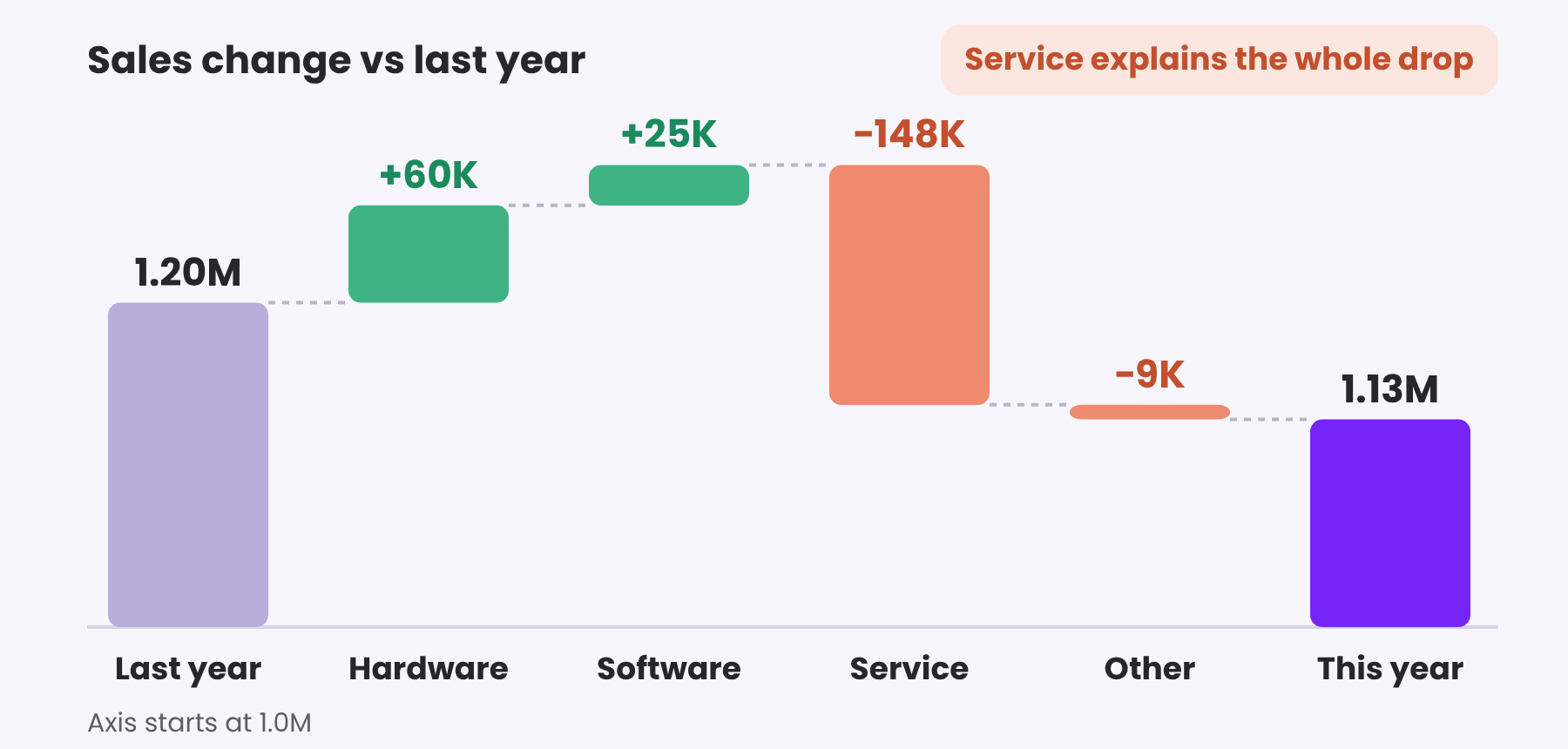
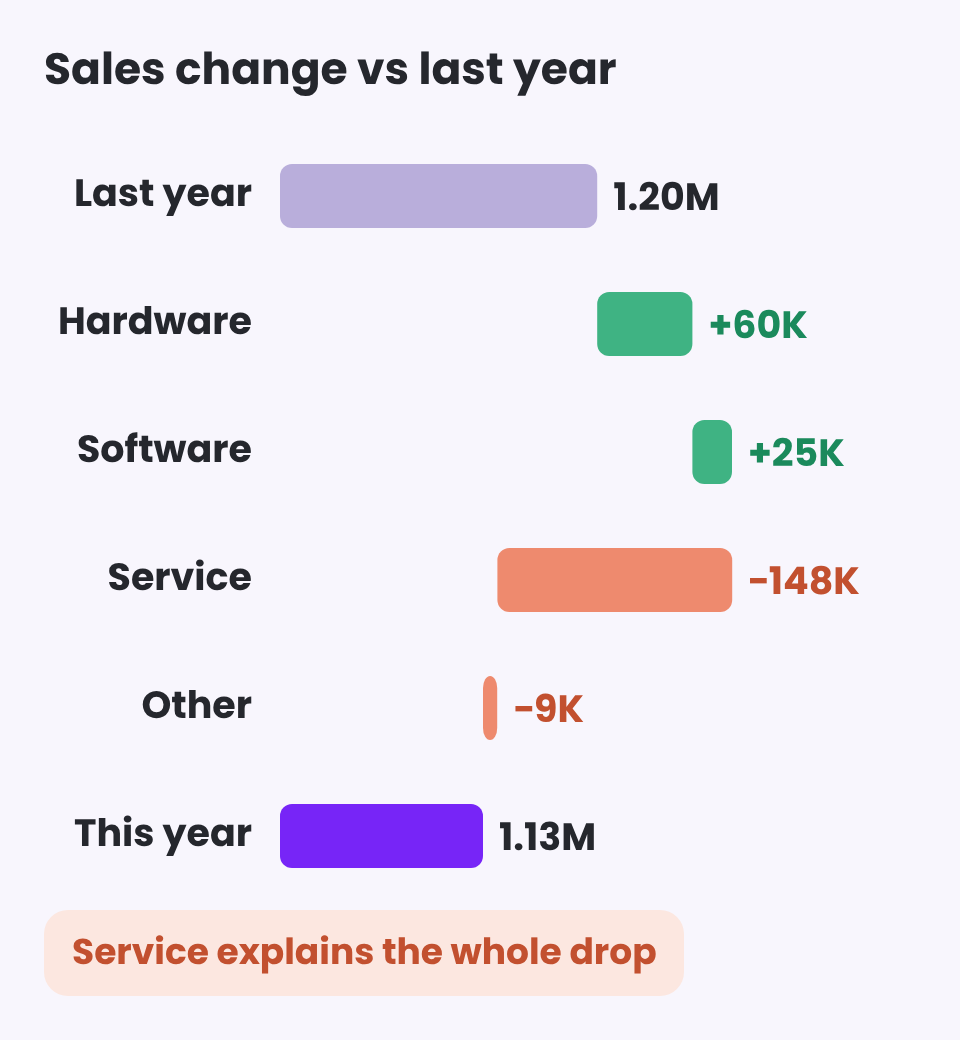
A bridge chart, also called a waterfall, shows this in one picture. It starts from last year’s number, adds or subtracts each contributor, and ends at this year’s number. In the example above, the total is down by 72K, but Hardware and Software are actually growing. Service explains the entire drop, and that is where the conversation should start.
Step 3: Separate price from volume
Sales can fall because customers bought fewer units, because prices or discounts changed, or because the mix moved toward cheaper products. Splitting the change into two parts tells you which conversation to have:
- Volume effect: the change in quantity, valued at last year’s price.
- Price effect: the change in average price, applied to this year’s quantity.
A drop driven by volume is a question for the sales team about activity and demand. A drop driven by price is a question about discounts and pricing.
Step 4: Look at customers: returning, lost and new
Total sales hide three very different stories: existing customers who bought more or less, customers who stopped buying, and new customers who arrived. A customer bridge shows each one separately. A drop caused by lost customers needs a win-back plan. A drop in what returning customers spend needs a different one. For a deeper look at who is about to leave, see RFM Segmentation: Find Your Best Customers and the Ones About to Leave.
Then say it in one sentence
Once the drivers are known, the report can write the conclusion for you, and update it with every filter:
Sales −6% vs last year. Service drove the drop (−148K), partly offset by Hardware (+60K) and Software (+25K).
Watch: Service, priority review. Agent 4, win back volume. Product B, check discounts.
A short watch list with a recommended action for each item turns the analysis into a plan. How reports can write insights like this is covered in From Dashboards to Analysis Systems: What Power BI Can Do Today.
| Step | Question | What to use |
|---|---|---|
| Baseline | Compared with what? | Last year and previous month, same number of days |
| Contribution | Who explains the change? | Bridge by cost center, agent, product |
| Price vs volume | Fewer units or lower prices? | Volume effect and price effect |
| Customers | Who left, who arrived? | Returning, lost and new customers |
Keep reading
From the BistarData shop
A dashboard that explains the change
Sales Signals does this analysis for you and writes the answers in plain language:
- Automatic written highlights vs last year and vs the previous month
- Cost centers, agents and products to watch, each with a recommended action
- Cost center bridge for sales, profit or margin
- Customer bridge: returning, lost and new customers
- Volume vs price effect, with the transaction details behind every chart