
Take two Power BI reports with exactly the same charts. In the first, every filter works, every total matches and a new page takes an hour to build. In the second, totals change depending on where you click, some filters do nothing, and every new question means another workaround. Users see the same screens. The difference is the data model underneath.
The model is the part of a report nobody sees, and it decides almost everything: whether numbers are correct, whether the report is fast, and whether it can grow without breaking.
Facts and dimensions: the star schema
A good model separates two kinds of tables:
- Fact tables hold events: invoice lines, quotes, orders, deliveries. Each row is something that happened, with numbers such as amount, quantity and cost.
- Dimension tables describe the who, what, where and when: customers, products, agents, branches and dates. Each row appears once.
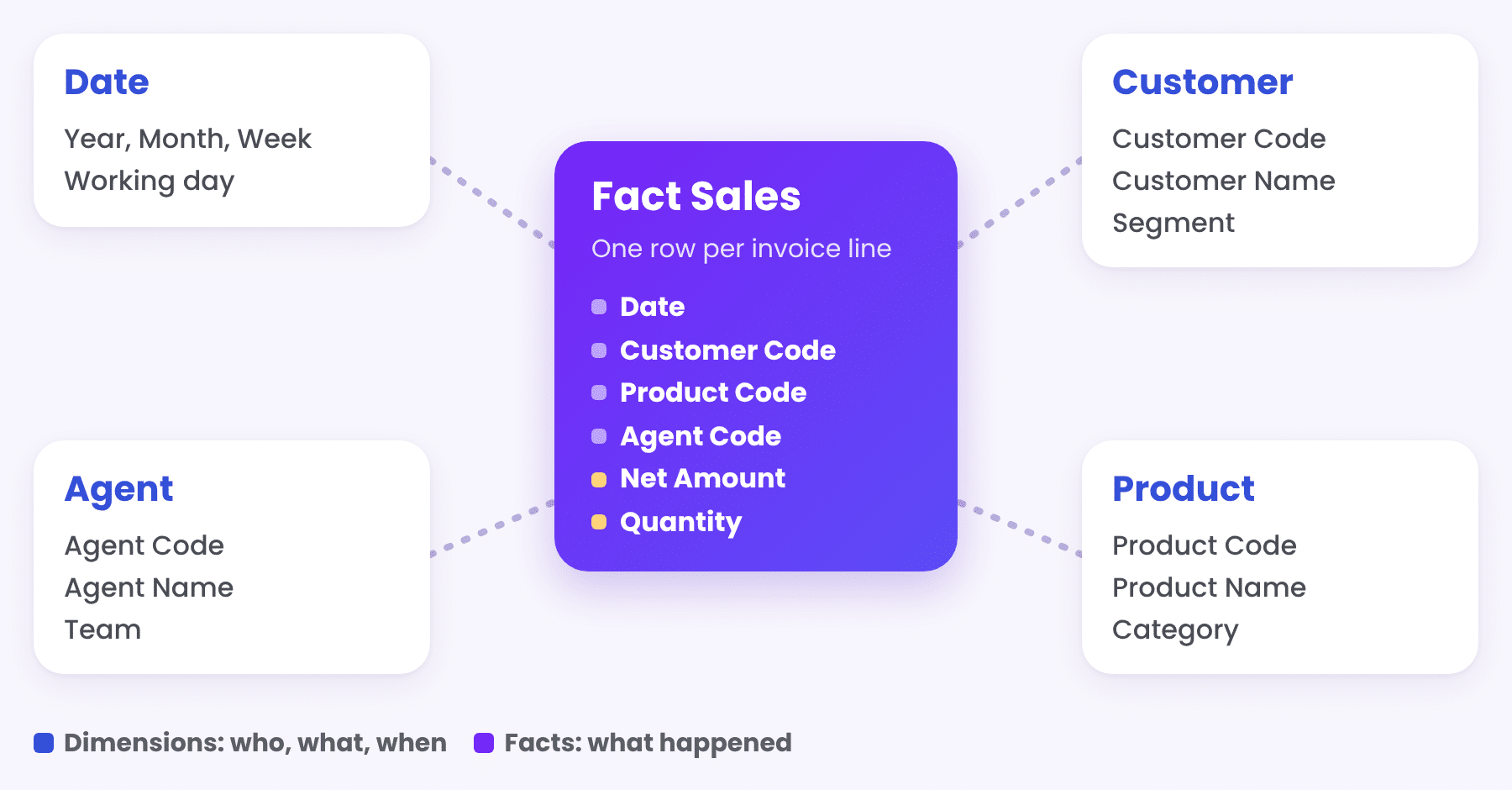
Put the facts in the middle and the dimensions around them, and you get a star. Filters flow from the dimensions to the facts in one direction, measures stay simple, and the report stays fast even with millions of rows. A customer filter works the same way on sales, quotes and returns, because they all use the same customer table.
Why one flat table is not enough
Many reports start from one wide export with every column in it. It works for the first page and then the problems begin: customer names repeated on every row, a product that appears under two names, quotes and sales that cannot be combined without counting the same deal twice. Splitting the flat table into facts and dimensions solves all of them at once.
S2T: knowing where every field comes from
Source to target mapping, or S2T, is a simple document with a big impact. For every field in the model, it says where it comes from in the source system and what happens to it on the way. Here is an example based on Priority ERP field names:
| Source field | Target field | Rule |
|---|---|---|
| CUSTNAME | Customer Code | Key to the Customer table |
| CUSTDES | Customer Name | Trimmed, used as the display name |
| PARTNAME | Product Code | Key to the Product table |
| PARTDES | Product Name | Used as the display name |
| IVDATE | Invoice Date | Date only, linked to the Date table |
With S2T in place, anyone can trace a number back to its source, a new team member can maintain the model, and a change in the source system does not break the report silently. It is also what lets the model show friendly business names to users while keeping a clear link to the original system.
A real date table
Every model needs its own calendar table: one row per day, with year, quarter, month, week and working day columns, marked as the date table in Power BI. Without it, time intelligence does not work properly, and comparisons such as month to date against the same days last year become hard to get right. More on this in Month to Date, Year to Date and Last Year: Getting Period Comparisons Right.
Measures defined once
Business logic belongs in measures, not in each chart. Net sales, margin %, change vs last year and target achievement are each written once, given a clear name and reused on every page. When a definition changes, it changes everywhere at once, and a definitions page inside the report tells users exactly what each measure means.
Layers that scale
A model that will grow is built in layers, each with one job:
- Source: the ERP database or the Excel files, as they are.
- Preparation: SQL views or Power Query steps that clean, rename and shape the data.
- Model: facts, dimensions, relationships and measures.
- Reports: the pages users see.
When a new source arrives, only the first two layers change. The model and the reports stay as they are.
A quick model checklist
| Question | A good sign |
|---|---|
| Are facts separate from dimensions? | Transactions in fact tables, lists in dimension tables |
| Do filters flow one way? | From dimensions to facts, no two-way relationships by default |
| Is there a date table? | One row per day, marked as the date table |
| Is every field traceable? | An S2T mapping from source to model |
| Is the logic in one place? | Measures with clear names and a definitions page |
Keep reading
From the BistarData shop
Templates built on a clean model
Every BistarData Power BI template is built on a star model like this one, with friendly field names, a proper date table and measures defined once. Each product comes with sample data in Excel and a user guide, so you can see exactly what shape your data needs:
- Sales Journey: Quote to Invoice: quotes, orders and invoices on one model, never double counted
- Sales Signals: sales, profit and margin vs last year, with written insights
- Customer Compass: RFM segments and Customer 360
- Delivery Flow: Order to Doorstep: every delivery from order to doorstep